
The Cheapest Voice Capture Pipeline: iPhone, Dropbox, and Local Whisper
Double-tap the back of your iPhone, speak, and a transcribed markdown file shows up on your Mac. No app to open, no cloud transcription, no LLM tokens. Here's the full implementation.

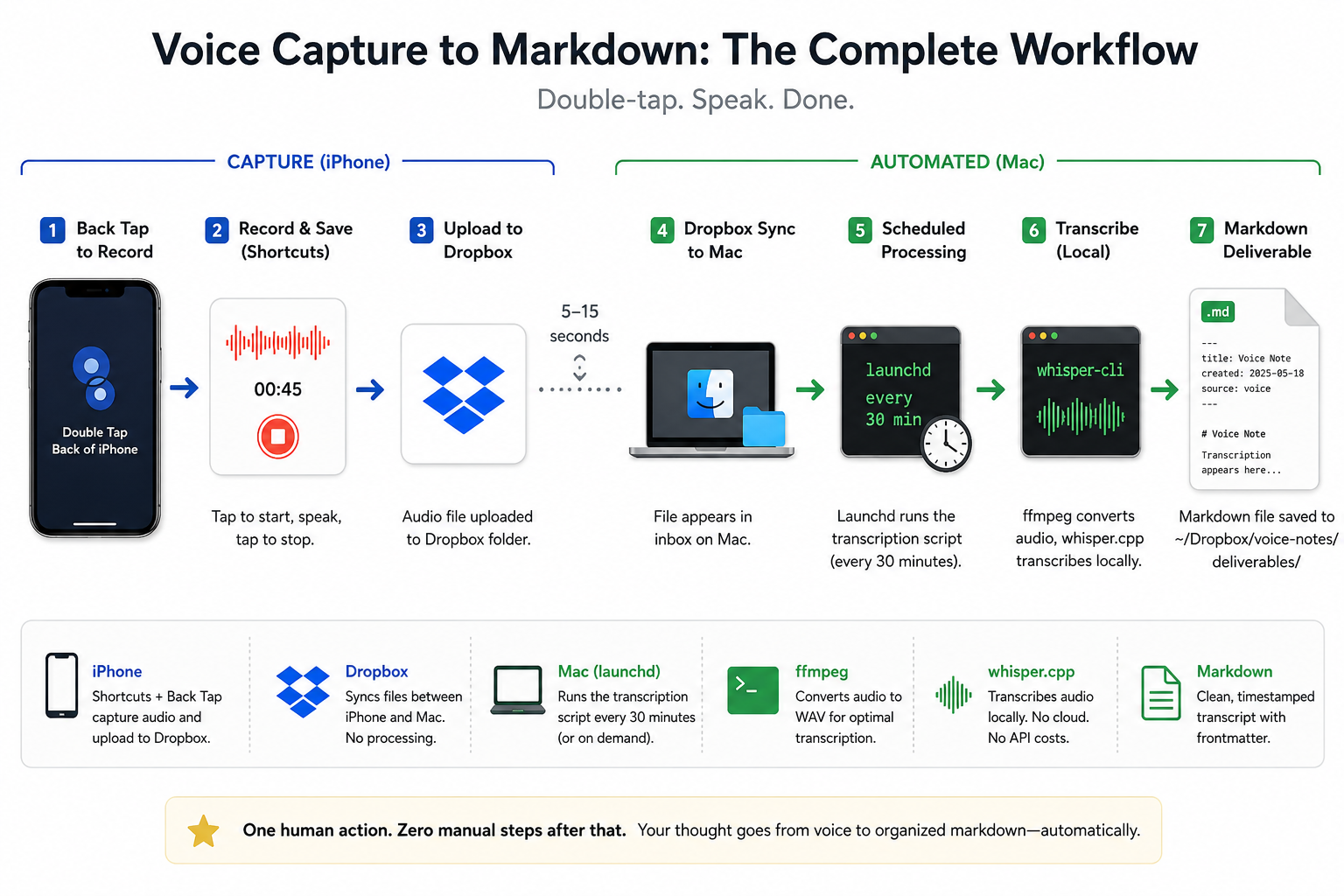
The friction in voice notes isn't recording. It's everything that happens after. The app you have to open. The recording you have to transcribe. The transcript you have to copy. The file you have to name. The folder you have to pick. By the time the thought is in the right place, you've forgotten half of it.
I wanted a capture path with one human action: speak. Everything else should happen on its own, and none of it should cost anything per use.
This is the pipeline I ended up with. It runs on a MacBook, an iPhone, and a Dropbox account you probably already have. Transcription happens locally via whisper.cpp. No cloud transcription service. No LLM tokens consumed by the default flow.
The whole thing took an evening to build and about ten minutes of iPhone setup. You can implement it yourself in under an hour.
The seed of the idea came from this YouTube walkthrough, which uses a similar iPhone-to-Mac voice capture path. That version leaves more of the post-capture work to a human: transcription and file handling are hands-on. What I built keeps the same iPhone capture entry point (Back Tap → Shortcut → Dropbox) but pushes everything after that into shell scripts and a launchd job. On both sides there's still a one-time human setup (iPhone Shortcut + Back Tap binding, Mac make setup) and the daily capture itself (double-tap, tap to start, speak, tap stop). The piece that's now automated is everything between the file landing in Dropbox and a markdown transcript showing up in your deliverables folder.
The stack
iPhone (Shortcuts + Back Tap)
  → Dropbox sync
    → MacBook (launchd every 30 min)
      → ffmpeg + whisper.cpp
        → markdown deliverable in ~/Dropbox/voice-notes/deliverables/
Four pieces, each doing one thing:
- iPhone Shortcut records audio and uploads it to a known Dropbox folder.
- Dropbox syncs the file to the Mac in 5–15 seconds.
- launchd runs a transcription script every 30 minutes (or on demand).
- whisper.cpp transcribes the audio locally and writes a markdown file with frontmatter.
Dropbox is the only third-party service in the path, and it's only doing file sync: no AI, no transcription, no processing. Transcription is a direct whisper-cli shell call on your machine.
Dropbox isn't special here. The transcription script just watches a local folder, so any sync service that can (a) accept a file from an iOS Shortcut and (b) mirror it to a folder on your Mac will work. Two popular swaps:
- iCloud Drive. The most native option on Apple hardware. Use the built-in Save File action in your Shortcut to write to iCloud Drive, then point
INBOX_ROOTat the synced folder under~/Library/Mobile Documents/com~apple~CloudDocs/(or a subfolder of it). - Google Drive. Install Google Drive for desktop on the Mac and the Drive app on the phone. Save the recording into a Drive folder from the Shortcut, then set
INBOX_ROOTto that folder under~/Google Drive/(or wherever you mount it).
Whatever you pick, the only thing the Mac side cares about is the local path, which you override with the INBOX_ROOT and DELIVERABLES_DIR environment variables. Nothing else in the pipeline changes.
Why local whisper.cpp
I had three options for the transcription step:
- Cloud API (OpenAI Whisper API, AssemblyAI, etc.). Fast, accurate, costs per minute, sends audio to a third party.
- Claude or another LLM with audio input. More expensive, overkill for a transcription-only step.
- Local whisper.cpp. Free, deterministic, runs on Apple Silicon in seconds, no network call.
For everyday voice notes, local wins. The base.en model is good enough for clear speech, fast enough to keep up with realistic capture volume, and free. The only steps that pay for an LLM are the ones that need language understanding, like proposing a semantic filename based on content. Those are opt-in.
What you need
- A Mac with Homebrew installed
- An iPhone 8 or newer running iOS 14 or later (Back Tap requires both the iOS version and an A11 chip or later)
- A Dropbox account synced to both
- About an hour, most of it waiting for the model to download
Mac side: setup
The Mac side is one command if you start from a fresh repo, plus two Homebrew packages it installs for you (ffmpeg and whisper-cpp; ffprobe ships inside the ffmpeg formula).
A repo-root Makefile exposes the entry points:
make setup     # one-time: folders, brew deps, model download, launchd job
make process   # on demand: process whatever's in the inbox right now
make stop      # pause the scheduler (reversible)
make uninstall # full teardown (keeps your data and model)
make setup does five things, all idempotent:
| Step | What it does |
|---|---|
| Create folders | ~/Dropbox/voice-notes/team-inbox/audio-captures/, processed/, ~/Dropbox/voice-notes/deliverables/ |
| Install dependencies | brew install ffmpeg whisper-cpp |
| Download the model | ggml-base.en.bin to ~/.cache/whisper.cpp/models/ |
| Install the scheduler | Renders a launchd plist and bootstraps it under your user session |
| Install the slash command | Symlinks the /process-inbox command into ~/.claude/commands/ for the optional semantic-rename step later |
You can change any of the paths via environment variables (INBOX_ROOT, DELIVERABLES_DIR, MODEL_DIR, MODEL_NAME). The defaults assume a Dropbox folder layout under ~/Dropbox/voice-notes/, but nothing in the script is specific to that prefix.
The whole thing is five short shell scripts, a Makefile, and a launchd plist template. I'll walk through the interesting parts below; the complete, copy-paste-ready source for every file is in the appendix at the end of this post.
The transcription script
The core of the Mac side is one shell script that runs on a schedule:
- List
*.m4afiles inaudio-captures/, skippingprocessed/. - For each file, run
ffprobeto confirm it actually contains an audio stream. (If your iPhone Shortcut is misconfigured, you can end up with text files that have an.m4aextension. Skip them with a clear log line and move on.) - Transcode the
.m4ato 16 kHz mono PCM WAV viaffmpeg. Whisper-cli on Homebrew doesn't decode.m4anatively, so this step matters. - Run
whisper-cliagainst the WAV with thebase.enmodel. - Read the recording's duration via
ffprobeand its capture timestamp viastat. - Write
~/Dropbox/voice-notes/deliverables/YYYY-MM-DD-HHMM-recording.mdwith frontmatter (source,duration_seconds,captured_at,transcribed_at) and the transcript body. - Move the source
.m4ainto aprocessed/subfolder so it doesn't get processed twice.
A few parts are worth seeing directly. The transcode-then-transcribe core is two commands: ffmpeg down-samples to the 16 kHz mono WAV that whisper.cpp expects, then whisper-cli runs the local model.
ffmpeg -hide_banner -loglevel error -y \
  -i "$src" -ar 16000 -ac 1 -c:a pcm_s16le "$tmp_dir/input.wav"

whisper-cli \
  --model "$MODEL_PATH" \
  --output-txt --output-file "$tmp_dir/out" \
  --no-prints --file "$tmp_dir/input.wav" >/dev/null
The transcript text gets wrapped with frontmatter as it's written to the deliverable:
{
  printf -- '---\n'
  printf 'source: %s\n' "$base"
  printf 'duration_seconds: %s\n' "$duration"
  printf 'captured_at: %s\n' "$captured_at"
  printf 'transcribed_at: %s\n' "$(date '+%Y-%m-%dT%H:%M:%S%z')"
  printf -- '---\n\n'
  cat "$tmp_dir/out.txt"
} > "$out_md"
And the guard that catches a misconfigured Shortcut before it crashes whisper: if ffprobe finds no audio stream, the file is skipped instead of transcribed.
is_real_audio() {
  local src="$1" streams
  streams=$(ffprobe -v error -select_streams a -show_entries stream=codec_type \
    -of csv=p=0 "$src" 2>/dev/null | head -n1)
  [[ "$streams" == "audio" ]]
}
The full script (preflight checks, timestamp and duration helpers, the processing loop) is in the appendix.
Two design choices worth calling out.
The inbox is the source of truth. If a file is in audio-captures/ and not in processed/, it hasn't been transcribed yet. There's no separate state file, no database, no queue. The filesystem tracks state.
The script exits 0 silently when the inbox is empty. launchd runs it every 30 minutes regardless. If you only record once a week, the other 335 runs are no-ops with zero log noise.
The launchd job
modern macOS prefers launchctl bootstrap over the legacy load/unload syntax. Use the new form or you'll hit ghost registrations:
launchctl bootstrap "gui/$(id -u)" "$HOME/Library/LaunchAgents/com.voicenotes.transcribe.plist"
The plist hardcodes a PATH of /opt/homebrew/bin:/usr/local/bin:/usr/bin:/bin so the script can find ffmpeg, ffprobe, and whisper-cli regardless of what login shell config exists. The job runs every 1800 seconds (30 minutes) and logs stdout/stderr to ~/Library/Logs/voicenotes-transcribe/.
You can also kick it manually any time:
launchctl kickstart "gui/$(id -u)/com.voicenotes.transcribe"
Or skip the scheduler entirely and use make process for instant on-demand runs.
The plist itself (a template with placeholders), the installer that renders and bootstraps it, and the teardown script that backs make stop and make uninstall are all in the appendix.
iPhone side: setup
This part can't be automated. Apple doesn't expose Shortcuts or Back Tap binding to external tools. You do it once, then forget it exists.
1. Install Dropbox on the iPhone
App Store → Dropbox → sign in with the same account that's synced to your Mac.
While you're in there, turn off the things Dropbox defaults to that you probably don't want:
- Dropbox app → Account → Camera Uploads: OFF (don't want every photo uploading over cellular)
- iOS Settings → General → Background App Refresh → Dropbox: OFF (Shortcut uploads don't need it; saves battery)
- iOS Settings → Notifications → Dropbox: mute (unless you want share-activity pings)
2. Build the "Audio Capture" Shortcut
Open Shortcuts → tap + → name it Audio Capture → pick a mic icon.
Action 1. Record Audio:
Add Action → search Record Audio → tap it. Set Start Recording to On Tap and leave Audio Quality at its default.
Action 2. Save Dropbox File:
Add the next action → search Dropbox → pick Save Dropbox File (the action with the blue Dropbox icon, not Get Dropbox File or any of the others).
Configure it carefully. This is the step where most setups go wrong:
- File: tap the input and pick Recorded Audio (the variable from Action 1). The action header at the top of the card must read
Save Recorded Audio, notSave File Path. If you seeSave File Path, you accidentally picked the generic path variable and your Shortcut will save a tiny text file with the recording's filename in it instead of the audio. Tap the blue pill and re-pickRecorded Audio. - Ask Where to Save: OFF (this is what reveals the Destination Path field)
- Replace Existing Files: OFF (avoids clobbering same-second captures)
Destination Path: enter the path below (or whatever you set on the Mac):
/voice-notes/team-inbox/audio-captures
First run will prompt for Dropbox authorization. Approve once.
The success check: your action card should read
Save Recorded Audio
  Ask Where to Save:        [OFF]
  Destination Path:         voice-notes/team-inbox/audio-captures
  Replace Existing Files:   [OFF]
3. Bind to Back Tap
Settings → Accessibility → Touch → Back Tap → Double Tap → Audio Capture.
That's it. Lock the phone, put it in your pocket.
4. Test once
Double-tap the back of your phone. Tap the front of the screen to start recording. Say something for 5–10 seconds. Tap Stop in the banner.
On the Mac, within 15 seconds:
ls -la ~/Dropbox/voice-notes/team-inbox/audio-captures/
You should see a real .m4a file at least a few hundred KB in size. If you see a .txt file or a 0-byte file, your Shortcut is wired to File Path instead of Recorded Audio. Go back and fix Action 2.
Then run make process. A markdown file with frontmatter should land in your deliverables folder, and the source .m4a should move to the processed/ subfolder.
The daily flow
Once it's set up, the entire daily capture flow is:
| Step | Action | Time |
|---|---|---|
| 1 | Double-tap back of iPhone | 1 sec |
| 2 | Tap front of screen to start | 1 sec |
| 3 | Speak | varies |
| 4 | Tap Stop in the banner | 1 sec |
| 5 | Dropbox syncs to Mac | 5–15 sec |
| 6 | launchd transcribes within 30 min, or make process for instant |
n/a |
No app to open. No unlock needed if Back Tap is enabled on the lock screen. The transcribed markdown shows up in a folder that's already in your normal workflow.
What's intentionally not automated
The interesting design decisions in a system like this are usually about what you don't automate.
- iPhone Shortcut creation and Back Tap binding. Apple platform constraint. Not worth fighting.
- Dropbox sync state verification. Looking at the menu bar icon is faster than polling
~/.dropbox/status. - Semantic slug naming. Default filenames are timestamp-based (
YYYY-MM-DD-HHMM-recording.md). Renaming them based on content requires an LLM, which costs tokens. So that step is opt-in via a slash command, not part of the default flow.
The hard rule I followed: Claude Code only gets invoked when a step genuinely needs language understanding. Transcription doesn't. Filename generation does. Keep the cheap deterministic steps in shell, and reach for the LLM only when the value is obvious.
Optional: semantic filenames
If you want filenames like YYYY-MM-DD-HHMM-feature-prioritization-thoughts.md instead of YYYY-MM-DD-HHMM-recording.md, run the opt-in slash command:
cd ~/Dropbox/voice-notes/team-inbox
claude
> /process-inbox
The slash command runs the same transcription script, then proposes a 3–5 word slug per file based on its first paragraph and asks you to confirm. This is the only step in the pipeline that consumes LLM tokens, and it only runs when you ask for it.
The command itself is just a markdown file. commands/process-inbox.md:
Run the audio-capture inbox processor.

Execute `scripts/process-inbox.sh` from the repo root.
That script uses `whisper-cli` directly, so no LLM calls are needed for transcription.

After it finishes:
- Report how many files were transcribed.
- If any deliverables were written this run, propose a short semantic slug
  (3–5 words) for each based on its first paragraph and offer to rename
  the file from the timestamp-only slug.
- If `process-inbox.sh` exits non-zero, surface the stderr verbatim.
A small installer (scripts/install-slash-command.sh, in the appendix) symlinks this file into ~/.claude/commands/ so edits stay tracked in your repo. It's the fifth thing make setup does, and the only piece that assumes you use Claude Code; skip it if you don't.
Troubleshooting (the three failures you'll actually hit)
A 0-byte or .txt file lands in your inbox. Your Shortcut's File input is wired to the generic File Path variable instead of Recorded Audio. Edit the Shortcut, tap the blue File Path pill on the Save action, and pick Recorded Audio. The action header should now read Save Recorded Audio.
whisper-cli: failed to read audio data as wav. The Homebrew whisper-cli build doesn't decode .m4a natively. The transcription script handles this by transcoding to WAV with ffmpeg first. If you see this error, your script is the older version. Pull main.
launchd seems loaded but never runs. Check launchctl print "gui/$(id -u)/com.voicenotes.transcribe" for the last exit code. The usual culprit is PATH. The plist needs to hardcode /opt/homebrew/bin:/usr/local/bin:/usr/bin:/bin so it can find whisper-cli and ffmpeg without your login shell config.
Where you could take it from here
Once the transcript exists as a plain markdown file, it's an input to anything. The deterministic pipeline gets you a clean, named transcript for free. From there, every extension is an opt-in LLM step you add only when the value is worth the tokens:
- Clean up the transcript. Raw speech is full of filler, false starts, and run-on sentences. An LLM pass can tighten it into readable prose, fix obvious transcription errors from context, and add paragraph breaks, while keeping a copy of the verbatim original.
- Route it to where you'll see it. Have the LLM summarize the note in a sentence and Slack or email it to yourself, so a thought captured on a walk is waiting in your inbox by the time you sit down.
- Pull out the action items. Ask it to extract any todos, decisions, or follow-ups into a checklist and append them to your task list or a daily note.
- Think the idea through with you. For a note that's really the seed of something, hand the transcript to Claude Code and let it ask clarifying questions, sketch an outline, or generate a short workflow of next steps to develop the idea. The voice note becomes the first turn of a conversation instead of a dead file.
None of these belong in the default flow. They cost tokens, and not every voice note deserves them. The point of keeping transcription deterministic and free is that you can afford to be selective about where the expensive, intelligent steps go.
Why this pattern matters
The deeper point isn't voice notes. It's the shape of the pipeline.
One human action triggers everything. The transport layer is something you already have (Dropbox). The compute happens locally and deterministically. The expensive AI calls are reserved for the one step that needs them, and they're opt-in.
That's the template I keep coming back to for personal automation: cheap deterministic steps in shell, scheduled by the OS, with an LLM call only where language understanding is the actual job. Most of the workflows I run on my own machine look like this now.
Set it up once. After that, the gap between thought and transcribed markdown is four taps and however long you talk.
Appendix: complete source
Everything you need, in one place. Drop these files into a directory with this layout, then run make setup. (The /process-inbox.md slash command body is in the "Optional: semantic filenames" section above.)
audio-capture/
├── Makefile
├── commands/
│   └── process-inbox.md          # optional /process-inbox slash command
├── launchd/
│   └── com.voicenotes.transcribe.plist.template
└── scripts/
    ├── setup.sh                  # folders, brew deps, model download
    ├── install-slash-command.sh  # symlink the slash command
    ├── install-launchd.sh        # render plist + bootstrap the job
    ├── process-inbox.sh          # the transcription work
    └── uninstall.sh              # stop | uninstall
Makefile:
SHELL   := /bin/bash
SCRIPTS := scripts

.PHONY: help setup process stop uninstall

help:
	@echo "Targets:"
	@echo "  setup      One-time: folders, brew deps, model, slash command, launchd job"
	@echo "  process    Transcribe pending .m4a files now"
	@echo "  stop       Pause the launchd scheduler (reversible via 'make setup')"
	@echo "  uninstall  Remove scheduler + slash command (keeps data, model, deps)"

setup:
	@bash $(SCRIPTS)/setup.sh
	@bash $(SCRIPTS)/install-slash-command.sh
	@bash $(SCRIPTS)/install-launchd.sh

process:
	@bash $(SCRIPTS)/process-inbox.sh

stop:
	@bash $(SCRIPTS)/uninstall.sh stop

uninstall:
	@bash $(SCRIPTS)/uninstall.sh uninstall
scripts/setup.sh:
#!/usr/bin/env bash
# Create folders, install brew deps, download whisper model. Idempotent.
set -euo pipefail

INBOX_ROOT="${INBOX_ROOT:-$HOME/Dropbox/voice-notes/team-inbox}"
DELIVERABLES_DIR="${DELIVERABLES_DIR:-$HOME/Dropbox/voice-notes/deliverables}"
MODEL_DIR="${MODEL_DIR:-$HOME/.cache/whisper.cpp/models}"
MODEL_NAME="${MODEL_NAME:-ggml-base.en.bin}"
MODEL_URL="https://huggingface.co/ggerganov/whisper.cpp/resolve/main/${MODEL_NAME}"

log() { printf '[setup] %s\n' "$*"; }

require_brew() {
  if ! command -v brew >/dev/null 2>&1; then
    log "ERROR: Homebrew not found. Install from https://brew.sh and re-run." >&2
    exit 1
  fi
}

ensure_dirs() {
  log "Ensuring inbox/deliverables/model directories exist"
  mkdir -p "$INBOX_ROOT/audio-captures/processed"
  mkdir -p "$DELIVERABLES_DIR"
  mkdir -p "$MODEL_DIR"
}

ensure_brew_pkg() {
  local pkg="$1"
  if brew list --formula "$pkg" >/dev/null 2>&1; then
    log "$pkg already installed"
  else
    log "Installing $pkg via brew"
    brew install "$pkg"
  fi
}

ensure_model() {
  local target="$MODEL_DIR/$MODEL_NAME"
  if [[ -s "$target" ]]; then
    log "Whisper model already present: $target"
    return
  fi
  log "Downloading whisper model to $target"
  curl -fL --progress-bar -o "$target" "$MODEL_URL"
}

main() {
  require_brew
  ensure_dirs
  ensure_brew_pkg ffmpeg
  ensure_brew_pkg whisper-cpp
  ensure_model
  log "Setup complete."
}

main "$@"
scripts/process-inbox.sh:
#!/usr/bin/env bash
# Transcribe pending .m4a files in the inbox.
# - Discovers unprocessed files
# - Runs whisper-cli (no LLM tokens)
# - Writes markdown with frontmatter to deliverables/
# - Moves source .m4a to audio-captures/processed/
# - Exits 0 silently when inbox is empty (keeps launchd cheap)
set -euo pipefail

INBOX_ROOT="${INBOX_ROOT:-$HOME/Dropbox/voice-notes/team-inbox}"
DELIVERABLES_DIR="${DELIVERABLES_DIR:-$HOME/Dropbox/voice-notes/deliverables}"
MODEL_DIR="${MODEL_DIR:-$HOME/.cache/whisper.cpp/models}"
MODEL_NAME="${MODEL_NAME:-ggml-base.en.bin}"

CAPTURES_DIR="$INBOX_ROOT/audio-captures"
PROCESSED_DIR="$CAPTURES_DIR/processed"
MODEL_PATH="$MODEL_DIR/$MODEL_NAME"

log() { printf '[process] %s\n' "$*"; }

require_cmd() {
  if ! command -v "$1" >/dev/null 2>&1; then
    log "ERROR: required command '$1' not found. Run 'make setup'." >&2
    exit 1
  fi
}

preflight() {
  require_cmd whisper-cli
  require_cmd ffmpeg
  require_cmd ffprobe
  [[ -s "$MODEL_PATH" ]] || { log "ERROR: model missing at $MODEL_PATH"; exit 1; }
  [[ -d "$CAPTURES_DIR" ]] || { log "ERROR: captures dir missing: $CAPTURES_DIR"; exit 1; }
  mkdir -p "$PROCESSED_DIR" "$DELIVERABLES_DIR"
}

# Duration in seconds (integer) from ffprobe.
get_duration() {
  ffprobe -v error -show_entries format=duration \
    -of default=noprint_wrappers=1:nokey=1 "$1" 2>/dev/null \
    | awk '{ printf "%d", $1 + 0.5 }'
}

# Capture timestamp from file mtime (macOS BSD stat).
get_capture_ts() {
  local epoch
  epoch=$(stat -f %m "$1")
  date -r "$epoch" '+%Y-%m-%dT%H:%M:%S%z'
}

# Output basename slug, e.g. 2026-05-20-1430-recording.
make_slug() {
  local epoch
  epoch=$(stat -f %m "$1")
  date -r "$epoch" '+%Y-%m-%d-%H%M-recording'
}

# Verify the file is real audio (has at least one audio stream).
# A misconfigured iPhone Shortcut can write a text file with an .m4a name,
# which crashes whisper-cli with a cryptic "failed to read audio data" error.
is_real_audio() {
  local src="$1" streams
  streams=$(ffprobe -v error -select_streams a -show_entries stream=codec_type \
    -of csv=p=0 "$src" 2>/dev/null | head -n1)
  [[ "$streams" == "audio" ]]
}

transcribe_one() {
  local src="$1"
  local base slug duration captured_at out_md tmp_dir
  base=$(basename "$src")

  if ! is_real_audio "$src"; then
    log "SKIP: '$base' is not a valid audio file (no audio stream)"
    return 0
  fi

  slug=$(make_slug "$src")
  duration=$(get_duration "$src")
  captured_at=$(get_capture_ts "$src")
  out_md="$DELIVERABLES_DIR/${slug}.md"

  # Avoid clobbering if a deliverable for the same minute already exists.
  if [[ -e "$out_md" ]]; then
    out_md="$DELIVERABLES_DIR/${slug}-$(printf '%s' "$base" | shasum | cut -c1-6).md"
  fi

  tmp_dir=$(mktemp -d)

  log "Transcribing $base"
  # whisper.cpp expects 16 kHz mono PCM WAV. Transcode via ffmpeg first;
  # the brew whisper-cli does not decode m4a/mp3/etc. natively.
  ffmpeg -hide_banner -loglevel error -y \
    -i "$src" -ar 16000 -ac 1 -c:a pcm_s16le \
    "$tmp_dir/input.wav"

  whisper-cli \
    --model "$MODEL_PATH" \
    --output-txt \
    --output-file "$tmp_dir/out" \
    --no-prints \
    --file "$tmp_dir/input.wav" >/dev/null

  {
    printf -- '---\n'
    printf 'source: %s\n' "$base"
    printf 'duration_seconds: %s\n' "$duration"
    printf 'captured_at: %s\n' "$captured_at"
    printf 'transcribed_at: %s\n' "$(date '+%Y-%m-%dT%H:%M:%S%z')"
    printf -- '---\n\n'
    cat "$tmp_dir/out.txt"
  } > "$out_md"

  mv "$src" "$PROCESSED_DIR/"
  rm -rf "$tmp_dir"
  log "Wrote $out_md"
}

main() {
  preflight
  shopt -s nullglob
  local files=("$CAPTURES_DIR"/*.m4a)
  shopt -u nullglob

  if (( ${#files[@]} == 0 )); then
    exit 0
  fi

  log "Found ${#files[@]} file(s) to process"
  local f
  for f in "${files[@]}"; do
    transcribe_one "$f"
  done
  log "Done."
}

main "$@"
launchd/com.voicenotes.transcribe.plist.template:
<?xml version="1.0" encoding="UTF-8"?>
<!DOCTYPE plist PUBLIC "-//Apple//DTD PLIST 1.0//EN" "http://www.apple.com/DTDs/PropertyList-1.0.dtd">
<plist version="1.0">
<dict>
  <key>Label</key>
  <string>@@LABEL@@</string>

  <key>ProgramArguments</key>
  <array>
    <string>/bin/bash</string>
    <string>@@PROCESS_SCRIPT@@</string>
  </array>

  <key>StartInterval</key>
  <integer>1800</integer>

  <key>RunAtLoad</key>
  <false/>

  <key>StandardOutPath</key>
  <string>@@LOG_DIR@@/stdout.log</string>

  <key>StandardErrorPath</key>
  <string>@@LOG_DIR@@/stderr.log</string>

  <key>EnvironmentVariables</key>
  <dict>
    <key>PATH</key>
    <string>/opt/homebrew/bin:/usr/local/bin:/usr/bin:/bin</string>
  </dict>
</dict>
</plist>
scripts/install-launchd.sh:
#!/usr/bin/env bash
# Render the launchd plist template and load it. No LLM calls.
set -euo pipefail

SCRIPT_DIR="$(cd "$(dirname "${BASH_SOURCE[0]}")" && pwd)"
WORKFLOW_DIR="$(cd "$SCRIPT_DIR/.." && pwd)"
TEMPLATE="$WORKFLOW_DIR/launchd/com.voicenotes.transcribe.plist.template"
LABEL="com.voicenotes.transcribe"
DEST="$HOME/Library/LaunchAgents/${LABEL}.plist"
LOG_DIR="$HOME/Library/Logs/voicenotes-transcribe"
PROCESS_SCRIPT="$WORKFLOW_DIR/scripts/process-inbox.sh"

log() { printf '[install-launchd] %s\n' "$*"; }

[[ -f "$TEMPLATE" ]] || { log "ERROR: template missing: $TEMPLATE" >&2; exit 1; }

mkdir -p "$LOG_DIR" "$(dirname "$DEST")"

log "Rendering plist to $DEST"
sed \
  -e "s|@@LABEL@@|${LABEL}|g" \
  -e "s|@@PROCESS_SCRIPT@@|${PROCESS_SCRIPT}|g" \
  -e "s|@@LOG_DIR@@|${LOG_DIR}|g" \
  "$TEMPLATE" > "$DEST"

# Modern macOS (10.10+) requires bootstrap/bootout instead of load/unload.
# bootout is idempotent (an error when not loaded is fine).
DOMAIN="gui/$(id -u)"
if launchctl print "${DOMAIN}/${LABEL}" >/dev/null 2>&1; then
  log "Booting out existing job"
  launchctl bootout "${DOMAIN}/${LABEL}" 2>/dev/null || true
fi

log "Bootstrapping job into $DOMAIN"
launchctl bootstrap "$DOMAIN" "$DEST"
log "Installed. Logs: $LOG_DIR/{stdout,stderr}.log"
scripts/uninstall.sh:
#!/usr/bin/env bash
# Tear down the automation. Leaves user data, model, and brew deps intact.
#   stop      - bootout the launchd job only (reversible via 'make setup')
#   uninstall - bootout + remove plist + remove slash-command symlink
set -euo pipefail

MODE="${1:-uninstall}"
LABEL="com.voicenotes.transcribe"
PLIST="$HOME/Library/LaunchAgents/${LABEL}.plist"
SLASH_CMD="${CLAUDE_COMMANDS_DIR:-$HOME/.claude/commands}/process-inbox.md"
DOMAIN="gui/$(id -u)"

log() { printf '[uninstall] %s\n' "$*"; }

unload_job() {
  if launchctl print "${DOMAIN}/${LABEL}" >/dev/null 2>&1; then
    log "Booting out $LABEL"
    launchctl bootout "${DOMAIN}/${LABEL}" 2>/dev/null || true
  else
    log "Launchd job $LABEL not loaded"
  fi
}

case "$MODE" in
  stop)
    unload_job
    log "Stopped. Re-enable with: make setup"
    ;;
  uninstall)
    unload_job
    [[ -f "$PLIST" ]] && { log "Removing $PLIST"; rm "$PLIST"; }
    [[ -L "$SLASH_CMD" || -f "$SLASH_CMD" ]] && { log "Removing $SLASH_CMD"; rm "$SLASH_CMD"; }
    log "Uninstalled. Recordings, transcripts, model, and brew deps preserved."
    ;;
  *)
    log "ERROR: unknown mode '$MODE'. Use 'stop' or 'uninstall'." >&2
    exit 1
    ;;
esac
scripts/install-slash-command.sh:
#!/usr/bin/env bash
# Install the /process-inbox slash command into ~/.claude/commands/.
set -euo pipefail

SCRIPT_DIR="$(cd "$(dirname "${BASH_SOURCE[0]}")" && pwd)"
WORKFLOW_DIR="$(cd "$SCRIPT_DIR/.." && pwd)"
SRC="$WORKFLOW_DIR/commands/process-inbox.md"
DEST_DIR="${CLAUDE_COMMANDS_DIR:-$HOME/.claude/commands}"
DEST="$DEST_DIR/process-inbox.md"

log() { printf '[install-slash] %s\n' "$*"; }

[[ -f "$SRC" ]] || { log "ERROR: source missing: $SRC" >&2; exit 1; }
mkdir -p "$DEST_DIR"

if [[ -L "$DEST" && "$(readlink "$DEST")" == "$SRC" ]]; then
  log "Symlink already in place: $DEST"
  exit 0
fi

if [[ -e "$DEST" || -L "$DEST" ]]; then
  log "Backing up existing file to ${DEST}.bak"
  mv "$DEST" "${DEST}.bak"
fi

ln -s "$SRC" "$DEST"
log "Linked $DEST -> $SRC"