
StudyBuddy: How I Built an AI-Powered Practice Test Generator for My Kids
What started as copy-pasting study guides into ChatGPT became a full application: email your homework photos, get a practice test PDF back in minutes. Here's how I built it.


Last year, I wrote about using ChatGPT to create practice tests for my kids. I'd paste their study guide into a prompt, ask for ten multiple-choice questions, and print the results. It worked. But it was manual, repetitive, and entirely dependent on me sitting down to do it.
My kids would come home with a stack of study materials, a test the next day, and a parent who might not have time to run the ChatGPT workflow that evening. The bottleneck wasn't AI. It was me.
So I built StudyBuddy: an application that lets my kids email photos of their study guides and get back a formatted practice test PDF, with an answer key I can review separately. No logins. No apps to install. Just email.
The Problem with Manual AI Tutoring
The workflow I described in my earlier post, "The AI Renaissance: How AI Transformed My Writing, Coding, and Learning," had real limitations:
- It required my involvement every time. I had to open ChatGPT (or Claude), upload the study guide, craft the prompt, copy the output, format it, and print it.
- Results varied by prompt quality. Some sessions produced great questions. Others missed key concepts because I didn't phrase the prompt precisely enough.
- No record keeping. I had no history of what tests were generated, what topics were covered, or how my kids performed over time.
- No scoring feedback. My kids would complete the practice test, but getting detailed explanations for each answer meant another round of prompting.
I wanted something my kids could use independently, something that would produce consistent results, and something that would give me visibility as a parent without requiring me to run every session.
The User Experience: Just Send an Email
Here's what the workflow looks like from my kids' perspective.
Step 1: Take photos. When they get a study guide or homework sheet, they photograph each page with my phone (they don't have their own yet). Good lighting and a flat surface help (shadows and angles degrade the results), but it doesn't require anything beyond the phone camera.
Step 2: Send an email. We compose an email to a dedicated StudyBuddy address, attach the photos, and hit send. They can include the subject name in the subject line ("7th grade math") or a test mode. Including "exact" triggers recall-style questions that reproduce the study guide verbatim. A subject like "7th grade science - exact" gives the system both the subject and the mode. If they leave the subject blank, the system defaults to comprehension mode, which rephrases concepts to test deeper understanding.
Step 3: Get a practice test back. Usually within 2-5 minutes (occasionally longer if GitHub Actions has a queue), they receive a reply email with a formatted PDF attached. The PDF has numbered questions with appropriate space for answers. They print it and complete it by hand.

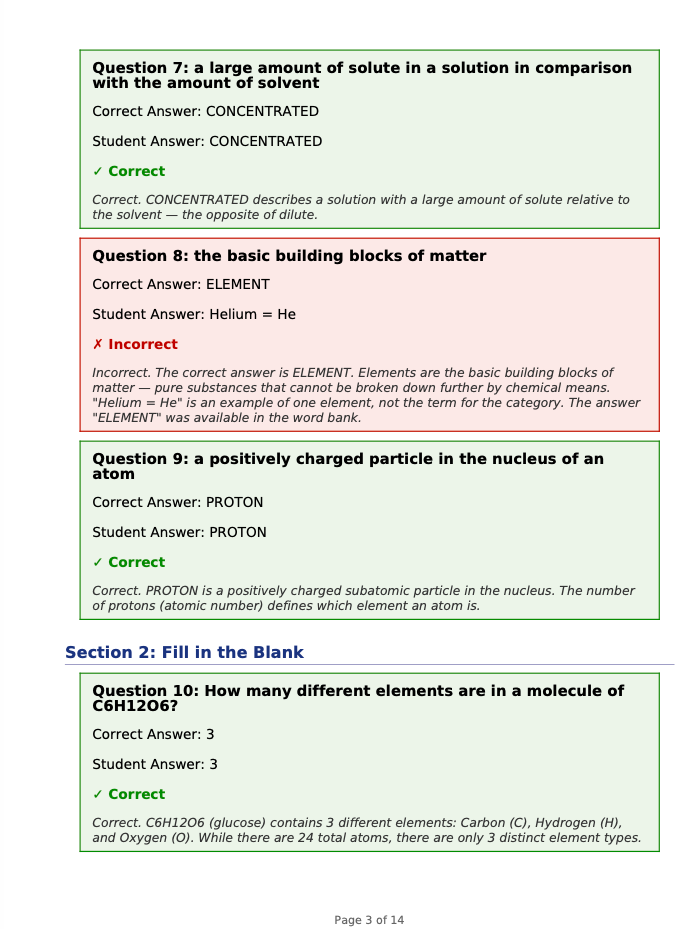
Step 4: Get scored. After finishing the test, they photograph their completed answer sheet and reply to the original email. StudyBuddy uses Claude's vision API to extract their answers, compares them against the answer key, and sends back a scoring report with per-question feedback explaining why each answer is correct or incorrect. Handwriting recognition isn't perfect. Messy handwriting or crossed-out answers can trip it up, and it does misread answers occasionally. For typical printed-and-filled-in worksheets, it's accurate enough that my kids trust the scoring. When a score looks off, I check the answer key manually.
From my kids' perspective, the entire interaction happens through email.
From my perspective as a parent, I have a separate view. The answer key PDF is withheld from the student email by default. I can review it, see what topics are being tested, and check the quality of the generated questions. I'm still the final arbiter, but I'm no longer the bottleneck.
You can sign up for the waitlist at studybuddy.redactedventures.com.
Two Test Modes: Recall and Comprehension
StudyBuddy generates two types of practice tests, and the distinction matters for how well kids actually retain material.
Recall mode reproduces questions from the study guide as closely as possible. If the teacher's study guide says "What year did the Battle of Gettysburg take place?", the practice test asks the same question. This leverages active recall: retrieving information you've already seen. Research backs this up (Roediger & Karpicke, 2006), but I noticed it firsthand: my kids retain more when they practice answering questions than when they review their notes passively.
Comprehension mode rephrases the concepts. Instead of asking the exact question from the study guide, it might ask "Which Civil War battle is considered the turning point of the war, and in what year did it occur?" Same underlying knowledge, but the student has to demonstrate understanding rather than pattern-matching memorized answers. Multiple-choice options also get shuffled to prevent relying on position memory from the original study guide.
The default is comprehension. Students can request recall by including "exact" in their email subject. Both modes produce the same output format: a clean PDF with the practice test and a separate answer key with explanations.
I read Make It Stick (Brown, Roediger, McDaniel, 2014) years ago, but as I built StudyBuddy I noticed how much of its design aligned with the book's principles. Both modes force retrieval practice. My kids answer questions instead of rereading notes, and I've watched that make a measurable difference in what they remember the next day. Comprehension mode pushes further: rephrased questions require them to reconstruct the concept, not just recognize it, and shuffled answer positions prevent them from memorizing "C, A, B" from the study guide. The planned spaced repetition feature would build on this by resurfacing the topics they got wrong across future sessions.
How It Works: Architecture
StudyBuddy has three parallel workflows that share the same core generation engine. The email workflow is the primary one my kids use, but I also use the CLI for batch-processing multiple study guides and the web app for testing prompt changes during development.
The Email Pipeline
| Step | What happens | Service |
|---|---|---|
| 1 | Student emails photos/scans of study material | Email client |
| 2 | Inbound webhook receives parsed email | Resend |
| 3 | Validate sender against allowlist, upload images | Vercel Function + Blob |
| 4 | Trigger generation workflow via repository dispatch | GitHub Actions |
| 5 | Download images, run Claude Code with 65KB prompt | GitHub Actions runner |
| 6 | Upload practice-test.pdf + answer-key.pdf | Vercel Blob |
| 7 | Completion webhook fires | Vercel Function |
| 8 | Fetch PDFs, send reply email to student | Resend |
The architecture is intentionally serverless. There's no always-on server to maintain. Vercel handles the webhook endpoints. GitHub Actions provides the compute for generation. Vercel Blob stores session files. Resend handles email send and receive. Setting up the inbound email side requires pointing MX records at Resend's inbound servers and configuring their webhook to POST parsed emails to the Vercel endpoint.
The tradeoff is operational visibility: four service dependencies means four places to check when something doesn't work. GitHub Actions provides built-in retry, but a webhook failure between Vercel and GitHub could mean a kid sends an email and never gets a response. These services are individually reliable, and this hasn't been an issue for our usage volume, but it's worth knowing where to look if it does.
Why GitHub Actions for Generation?
This was a deliberate choice. Claude Code runs as a CLI tool, and the generation prompts are large (the test generation prompt alone is around 65KB of detailed instructions). GitHub Actions gives me a clean Linux environment with Claude Code installed, and the workflow is triggered via repository dispatch from the Vercel webhook. It also gives me built-in logging, retry capability, and artifact storage for debugging.
That 65KB prompt is the result of iterating through dozens of failure modes over several months. At a high level, it's organized into sections: output format specification, question type templates (with per-type rules for MCQ, short answer, matching, show-your-work), difficulty calibration rules, topic coverage requirements, and anti-hallucination guardrails that prevent Claude from inventing facts not present in the source material. Here's an example of a guardrail rule from the prompt:
STRICT RULE: Every generated question must be directly answerable
using ONLY the information visible in the provided study guide images.
Do not generate questions about related topics, historical context,
or background information not explicitly present in the source material.
If the study guide contains 8 items, generate exactly 8 questions.
More on the specific failure modes below.
The alternative would have been running generation inside a Vercel serverless function, but the generation step can take 30-60 seconds depending on the number of study guide pages, which exceeds typical serverless function timeout limits. Combined with GitHub Actions runner queue time, the end-to-end latency from email sent to PDF received is typically 2-5 minutes. GitHub Actions has a generous timeout and doesn't charge per-second, though the free tier caps at 2,000 minutes per month, more than enough for a family's study sessions.
The Generation Engine
The core of StudyBuddy is a Python backend built with FastAPI. The generation pipeline works like this:
- Image processing. Study guide photos are converted to PNG or JPEG, resized to 2048px max width (the sweet spot for Claude's vision API: large enough for legible text, small enough to keep token costs reasonable), and enhanced with contrast and sharpness adjustments. The system handles HEIC files from iPhones, PDFs, and standard image formats.
- Vision analysis. Images are encoded as base64 and sent to Claude's vision API as content blocks. Claude analyzes the structure of the study guide: how many questions it contains, what types they are (multiple choice, true/false, short answer, fill-in-the-blank, matching, show-your-work), and what topics are covered.
- Question generation. Based on the analysis and the selected mode (recall or comprehension), Claude generates a structured JSON response with each question, its type, answer choices (if applicable), the correct answer, an explanation, and the topic.
- PDF export. The JSON is rendered into two PDFs using FPDF2: a student-facing practice test (no answers) and a parent-facing answer key with full explanations. Question spacing varies by type: multiple choice gets 4 lines, short answer gets 16 lines, show-your-work gets a full half-page.
Scoring Pipeline
When a student replies with photos of their completed test, a separate pipeline handles scoring:
- Answer extraction. Claude reads the handwritten or typed answers from the photos.
- Session linkage. Each generated PDF includes a human-readable session UUID printed in the footer. When Claude reads the photo of the completed test, it extracts this UUID from the footer text to connect the answers back to the original test and its stored answer key. If the footer gets cut off during printing or isn't captured in the photo, the system falls back to matching based on the email thread.
- Comparison. Each student response is compared against the stored answer key.
- Report generation. A scoring report PDF is generated with per-question results, point totals, and explanations for incorrect answers.
Security and Access Control
Since this system involves my kids, security was non-negotiable:
- Email allowlist. Only pre-approved sender addresses can trigger generation. Unknown senders get no response. This is the simplest access control I could build, with no passwords for kids to manage or forget. Email spoofing is a known risk. Resend's inbound webhook includes SPF/DKIM verification headers, which the system checks before processing. The realistic worst case is someone burning API credits, not a data breach.
- Parent authentication. The web dashboard uses PBKDF2-based password hashing with constant-time comparison, so only I can access answer keys and session history.
- Webhook verification. The generation-complete callback uses bearer token authentication with timing-safe comparison to prevent token-guessing attacks.
- Input validation. File uploads are restricted to an allowlist of extensions. All database queries use parameterized SQL. Text inputs are sanitized.
- Secrets management. All API keys and credentials live in environment variables. Nothing is hardcoded.
The Tech Stack
| Component | Technology |
|---|---|
| Backend API | Python 3.11+, FastAPI, SQLite |
| Email workflow | Next.js on Vercel, Resend |
| Compute | GitHub Actions (test generation), Vercel Functions (webhooks) |
| Storage | Vercel Blob (session files), SQLite (structured data) |
| AI | Anthropic Claude (primary), OpenAI (fallback) |
| PDF generation | FPDF2 with Unicode support |
| Image processing | Pillow, pillow-heif (for iPhone HEIC) |
| Testing | pytest (Python), vitest (JavaScript), 80%+ line coverage gate |
| CI/CD | GitHub Actions with coverage enforcement |
Heuristic Fallback
The system includes a fallback chain for test generation. If the Claude API is unavailable, it tries OpenAI as a secondary provider. If both APIs are down, StudyBuddy falls back to a heuristic generator that works without any AI: it uses regex patterns to identify question structures (sentences ending in "?", numbered items, key terms) and generates fill-in-the-blank variations by masking those terms. For example, "The Battle of Gettysburg took place in 1863" becomes "The Battle of _______ took place in _______." The results are basic, but the system produces something rather than failing silently. In practice, I've never had both APIs go down at the same time, so the heuristic fallback exists as a safety net but hasn't been battle-tested in production.
What I Learned Building This
Email as an interface removes friction. My kids already know how to send email. There's no app to install, no login to remember, no UI to learn. It's not zero effort (they still have to photograph pages, compose the email, and attach the images), but it's significantly less friction than any alternative I considered. This matters more than any feature I could add to a web dashboard.
AI-generated tests need guardrails. Left unconstrained, Claude sometimes generates questions that are too easy, too hard, or outside the scope of the study guide. The 65KB generation prompt exists because I iterated through dozens of failure modes:
| Failure Mode | Fix |
|---|---|
| Generated 15 questions when the study guide had 8 items | Explicit rule: match the source item count exactly |
| History questions drifted into related-but-untested topics | Anti-hallucination guardrail: only test what's visible in the source material |
| Answer explanations contradicted the correct answer | Validation step requiring internal consistency between answer and explanation |
| Math questions tested comparative analysis when study guide required listing facts | Difficulty calibration: match the cognitive level of the source material |
Each failure mode became an explicit rule in the prompt. The prompt is the product. That said, a 65KB prompt is a maintenance commitment. Model updates can shift behavior, and rules that worked on one version of Claude sometimes need adjustment on the next. I've had to revisit the prompt after model upgrades twice so far.
Serverless fits this use case well. My kids don't study 24/7. The system might process three emails on a Tuesday evening and then sit idle for days. Paying for an always-on server would be wasteful. The combination of Vercel (webhooks), GitHub Actions (compute), and Vercel Blob (storage) means the infrastructure cost is effectively zero for our usage volume , all within free tiers. The AI API cost is the real variable expense. Each generation costs roughly $0.15-0.30 in API tokens depending on the number of study guide pages. At around 8-10 tests per month during the school year, the Anthropic bill runs about $3-5/month. Not free, but far less than a tutor.
Parent visibility matters. I can see every test that gets generated and review answer keys before my kids see their scores. I'm not outsourcing my kids' education to AI. I'm using AI to scale the practice test workflow I was already doing manually.
What's Next
StudyBuddy is a working system that my family uses regularly, around 8-10 sessions per month during the school year, more during exam periods. There are a few directions I'm exploring:
- Socratic tutoring via email reply. Instead of just scoring answers, have Claude guide students through incorrect answers using the Socratic method: asking leading questions rather than giving direct answers. The latency of email makes this harder than it sounds; real Socratic dialogue depends on rapid back-and-forth. This will likely need a different interface, possibly a chat-based one, to work well.
- Spaced repetition tracking. Track which topics a student gets wrong repeatedly and automatically generate review questions on those topics in future sessions.
- Multi-turn conversation. Allow students to ask follow-up questions about specific problems by replying to the scoring email.
The session model already tracks each question's topic, difficulty, student response, and whether it was correct, so these extensions build on existing data rather than requiring architectural changes.
The Bigger Picture
When I wrote about using AI for my kids' learning last year, I was describing a manual process. Copy, paste, prompt, print. StudyBuddy is what happens when you take that manual process and build a system around it.
The AI capabilities have improved. Larger context windows made the 65KB prompt possible, and vision quality keeps getting better. But the model alone wasn't the limiting factor. I could generate good practice questions a year ago. What I couldn't do was get those questions to my kids without being in the loop. By wrapping AI generation in an email-driven, serverless pipeline, I removed myself as the bottleneck and gave my kids a tool they can use independently.
That's the pattern I keep seeing: the model is the prerequisite, but the breakthrough is the system you build around it.
You can sign up for the waitlist at studybuddy.redactedventures.com.